
ExacqGo
Reimagining Mobile Access: Gesture-Driven Entry for Smart Security

Overview
My team and I partnered with Johnson Controls to design a mobile-first access control system that replaces keycards with secure, gesture-driven smartphone access: tap, twist, and swipe to unlock, plus built-in visitor management for seamless check-ins.
My Role: I led End-To-End from the research and synthesis, and owned the visitor-access and gesture-unlock flows from concept through usability testing.
Client:
Industry:
Smart Building Technology
Duration:
8 months
Team:
1 UX Researcher, 2 UX Designers, 1 Developer
Role:
User interviews, literature reviews, competitor analysis, persona development, prototyping, and usability testing.
Tools:


Challenge
How might we create a mobile access control system that is secure and intuitive for managing the physical access across work environments?
Johnson Controls builds access technology for government and corporate spaces worldwide. As part of their vision to expand seamless and secure access beyond offices to gated communities and other facilities, they sought a better, more user-friendly way for people to manage entry. I joined the team to research the problem and design that system.
![Medium [Dark].png](https://static.wixstatic.com/media/dc188d_100efe504a4e43b191a987803fc30096~mv2.png/v1/crop/x_0,y_0,w_1170,h_359/fill/w_980,h_301,al_c,q_85,usm_0.66_1.00_0.01,enc_avif,quality_auto/Medium%20%5BDark%5D.png)
What Users Struggled With
User interviews revealed the challenges that were faced by the users, needing improvement in mobile access control solutions.

"Over time, my keycards and fobs just stop working reliably. Sometimes the door won’t even scan my card."

“Visitors have to rely on me as there aren’t clear instructions at the entrance. It’s annoying having to help every time.”

“I’m always misplacing my keycard, which means calling security and waiting for him to let me in."

“I like the mobile app, but if my phone dies or Bluetooth fails, I have no way to get in. That’s why I still carry a physical key.”
ExacqGo
The smarter, faster way to access your workplace!
Your key, now in Apple Wallet !


Breakdown Of the Problem
1.
Physical keycards and fobs degrade over time, causing unreliable access.
2.
Lack of clear instructions for visitors forces residents to assist constantly.
3.
Misplaced keycards and phone dependency create delays and inconvenience.
4.
Mobile app and Bluetooth solutions are unreliable, leading to reliance on physical keys.
Research Process

Business Strategy
Market Opportunity Analysis
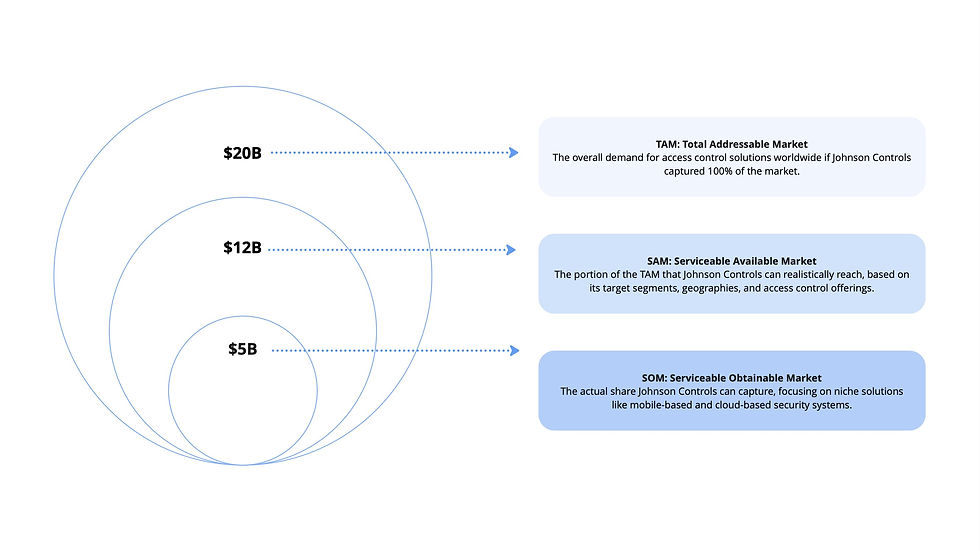
I studied the smart building market: trends, customer segments, and who else was competing. That gave Johnson Controls a view of its total, serviceable, and obtainable market.
Competitor Analysis
For competitor analysis, I studied over 20+ companies, assessed their integration capacity and credential strength, and examined both their advantages and disadvantages in the market.

What Did The Competitors Lack?
01
Efficient Visitor Management
02
Role-based door access
03
Offline / backup functionality
04
Advanced customization
Understanding the User
User Analysis
I conducted 14+ user and expert interviews, surveys, and a field visit to understand needs and expectations. Insights from this research helped us create our persona, Allie.

User Journey
Based on my user interviews, I created a journey map for Allie, our persona, an employee unlocking her office door and managing visitor access. I found that while basic access was straightforward, visitor access was the task most users struggled with, often leading to confusion and frustration. This analysis helped me identify opportunities to simplify the process and improve the overall experience.

Task Analysis
After understanding how users go through the process and creating the user journey, I collaborated with the Johnson Controls tech and engineering team to develop a task analysis for each step, highlighting what’s important to integrate into the app for a smoother, more efficient experience.


Designing The
Final Product
ExacqGo
App Experience
This mobile-first access control app transforms how employees and visitors interact with secure spaces. By replacing outdated keycards with a digital-first system, it streamlines entry, improves security, and enhances the workplace experience through intuitive and scalable design.
Tap & Go Access
Unlock doors with BLE or NFC, keep credentials in your digital wallet.
Guest Pass Made Simple
Send e-invites for visitor to check-in,
no app needed.


Move with a Gesture
Twist, tap, or swipe to open doors in seconds.
All Sites, One App
Effortlessly manage multiple locations from a single dashboard.
Mapping Out the Ecosystem
IOT Architecture
Collaborated with engineers to understand the technical feasibility of the design concepts and how they could translate into a functional door access system.

Mid-Fi Wireframes
After exploring early concepts through sketches, I moved into mid-fidelity wireframes to establish a solid foundation for the app. Working closely with the tech and engineering teams, I defined the core screens for door access and visitor management, ensuring the structure was clear and technically feasible.

Core System Features
Onboarding
The onboarding process provides secure, personalized access. Admins set role-based permissions, and users authenticate via email, create a passcode, and enable Face ID for quick, contactless entry—ensuring both convenience and strong security


It begins by adding your organization/company-issued access card into your Apple/Google wallet - the first step to seamless door access.

A simple twist gesture activates door unlocking to your nearby door through built-in motion sensors.

Alternatively, users can swipe the unlock button to unlock nearby doors, receiving subtle sound and haptic feedback once access is granted.

Navigate to the Doors page to search for specific doors, view nearby ones within range, or quickly access your favorites.
Gesture Control In Action
Twist to Unlock
The system recognizes the user’s Twist Gesture via phone sensors and communicates with the smart door reader, instantly unlocking the door.
Developed a working demo that includes both the door reader interface (iPad screen) and the mobile access screen. The screen reflects live access status, demonstrating the full end-to-end functionality.


Visitor Door Access
The user navigates to the Visitor page and enters the visitor’s details. An email invitation is then sent to the visitor to start the verification process and receive their temporary pass.

At the visitor end

How the Proposed System Solves the Problems

Inconvenience of Physical Access Cards
Traditional keycards are easily misplaced and require manual replacement. The proposed system uses BLE/NFC technology, allowing users to unlock doors securely through their smartphones, reducing dependency on physical cards.

Inefficient Visitor Check-In
Process
Manual visitor access causes delays and security gaps. This new system enables guests to receive digital passes and check in seamlessly without downloading an app, improving both speed and user experience without any delays.

Limited Visibility and Control Over Access
Users previously lacked real-time awareness before unlocking doors. By integrating live camera previews and multi-site control, the system empowers users to make informed decisions, ensuring greater security and transparency.
Impact That Speaks For Itself....
01. A/B Testing
Compared button treatments head to head to settle on a single unlock control before building the flows out.
02. Think-Aloud
Task based sessions across two rounds, with participants narrating their thinking as they moved through the app.
03. SUS Survey
A standard System Usability Scale questionnaire run after each round to track perceived usability over time.

What Testers Had to Say
The gesture you designed is brilliant, it feels like you are actually opening a door. The implementation of the prototype is excellent.
Gesture-based entry and visitor access with integration of Apple and Google Wallet is an excellent idea. The interaction and security protocols are thoughtful and effective.
Glad you didn't just make a Figma prototype and actually developed the app. Please bring this to universities as student access cards.
